
How can I renew Support & Upgrades for a Perpetual license?

Access to Helpdesk Support & Software Upgrades is available immediately upon renewal of 12 month Support & Upgrades package.

  1. Login to the MediaCP Client Portal
  2. Click on My Licenses
  3. Click on the relevant Perpetual License from the list displayed
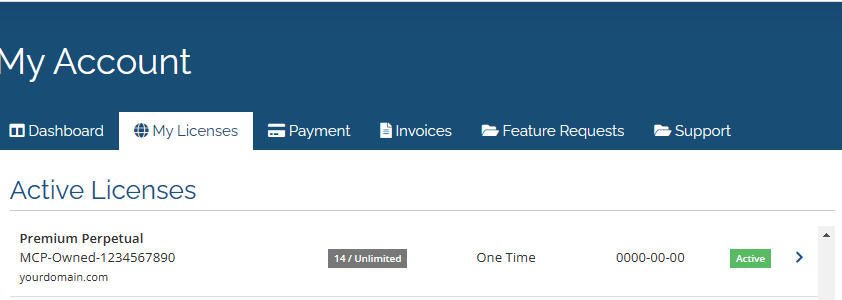

  4. Click on the green Renew Support & Upgrades button on the right hand side of the page
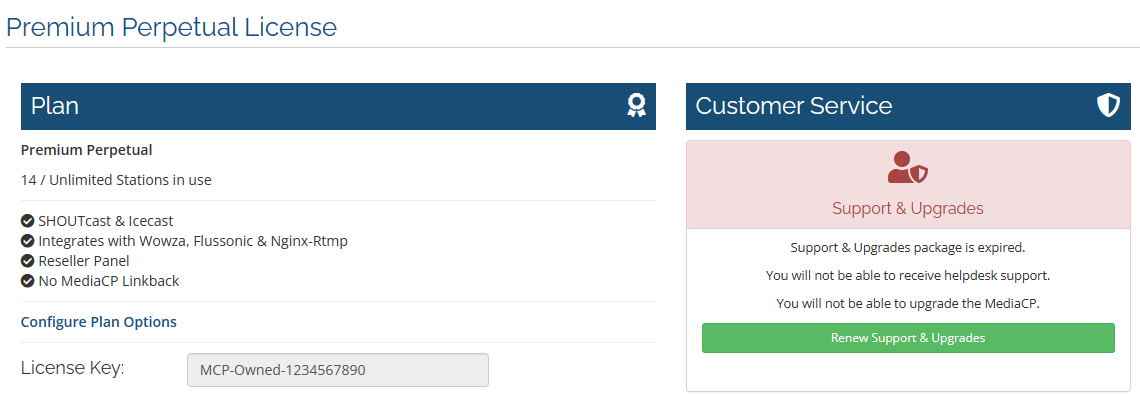

  5. Complete the purchase and checkout process

  • perpetual, support, upgrades, billing
  • 4 Users Found This Useful
Was this answer helpful?

Related Articles

I cancelled my license but I still keep getting charged, how can I stop this?

We will never double bill you or continue to bill you once your license has been cancelled.  We...

I would like to cancel my licence

Before cancelling a licence we'd very much like to rectify any problems which might be leading...

PayPal Subscription Underpaid My Invoice

Why do I have a balance to pay on my invoice? PayPal Subscriptions send a fixed amount defined...

Subscription Invoices, Grace Period, Suspension & Termination

When are invoices generated for subscriptions? Invoices for recurring subscriptions are...

I forgot to pay my invoice and my license is suspended. Why is there no grace period?

All subscriptions include a 2 day grace period should payment not be received. We understand that...